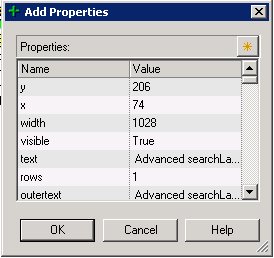
Add description property screen is always small: this is certainly a developer laziness issue. The screen 'Add Property' in Object Repository window do not record its size and position when exiting. So, EVERY TIME you have to re-size it. Annoying!
Object repository window doesn't re-sizes correctly: when editing a table checkpoint (and a few other objects I can't recall), here is what happens when you re-sizes the window. Controls at the right side are not re-sized accordingly. It's a REAL PAIN to edit the cell contents.

Also (1), you may notice that fields under 'Configure value' section are disabled. This is due a bug where Alt-Tab'ing out from this window, makes the fields to become disabled.
Also (2), after re-sizing controls in this window (and making it better to work with), when you exit and re-open it all controls will be reset to its default positions. And that SUCKS A LOT!
Random crashes: seriously, who NEVER EVER suffered a single crash during QTP execution or (more commonly) after closing it down? Usually, when you start experiencing weird QTP behavior after hours and hours of work, close it down and you will get one of these. Below, follows an example.

Code auto-complete is more like a pain in the
Jump to step doesn't always work: one good feature from Results Viewer app is the "Jump to Step" option. On (almost) every step recorded in the test result, you can right click it and choose "Jump to Step in QTP" to automatically switch to QTP in the exact line executed, but for some strange reasons, some steps are not 'jumpable'.

I can't determine why it happens (perhaps it's a step executed from inside a function on a Function Library, I don't know), but for whatever reason it's another huge


