Wow, another post that took me a while to find a good title.
Yet another QTP issue which forces you to close it down and open it up all the way. Nothing else much to say regarding this, the screenshot is self explanatory.
Thanks to my coworker for the screenshot.
Yeah, you've read it right. If you ever used HP QuickTest Professional (or simply QTP) software, you know what to expect from this blog. A full list of all sorts of bugs we ever found in QTP (aka probably the worst commercial software ever seen).
Mostrando postagens com marcador qtp. Mostrar todas as postagens
quarta-feira, 19 de junho de 2013
[BUG] Bad, bad object repository
I've been reluctant in the past few weeks to publish this bug, but I decided to do it anyway. I haven't been able to track exactly how to reproduce the issue, but I see it happening on a daily basis. Here it goes:
The famous and extensively used Object Repository (aka OR) has a major series of bugs (already demonstrated in this blog). This feature has a huge play in QTP utilization, and is a crucial feature in this tool. Can't believe it's so buggy.
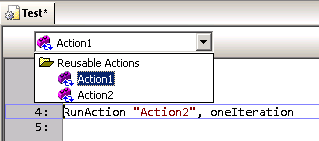
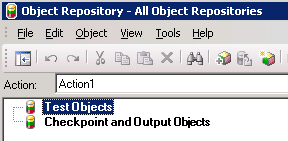
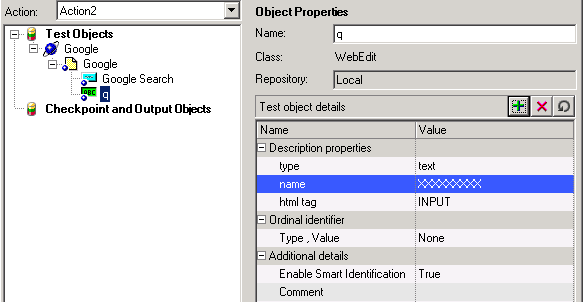
Inside the OR window, there's a dropdown list where you can select which action you want to edit the containing objects. Turns out that, if you change to another that is different from the current one on QTP window, the OR (or QTP itself - who knows?) doesn't save the changes you make.Fuck! Oh boy!
After following the steps above, all changes you made are not saved.
Workaround: Well, there nothing much to do about it, except to close the OR window, switch to the correct action in QTP and re-open the OR window. By doing so, you guarantee that the objects/checkpoint/etc you edit will be correctly updated and saved.
The famous and extensively used Object Repository (aka OR) has a major series of bugs (already demonstrated in this blog). This feature has a huge play in QTP utilization, and is a crucial feature in this tool. Can't believe it's so buggy.
Inside the OR window, there's a dropdown list where you can select which action you want to edit the containing objects. Turns out that, if you change to another that is different from the current one on QTP window, the OR (or QTP itself - who knows?) doesn't save the changes you make.
After following the steps above, all changes you made are not saved.
Workaround: Well, there nothing much to do about it, except to close the OR window, switch to the correct action in QTP and re-open the OR window. By doing so, you guarantee that the objects/checkpoint/etc you edit will be correctly updated and saved.
quinta-feira, 6 de junho de 2013
[BUG] Fasten your seat belts, QTP menu is missing!
Oh boy, yet another shameful bug on QTP. Not much to say this time as you are probably tired of reading the same whining over and over. And I don't feel like joking around. Sorry.
I have absolutely no idea why it happens. It just happens.
From time to time, QTP seems to lose or forget its menu configuration, leaving the user with a very limited amount of options. See examples below.
Workaround: fortunately for us, there a very simple way to make QTP put its menu configurations back in place, where it should never had left.
Right-click anywhere in the menu/buttons area and select Customize.
Next, go over the Toolbars tab and click Restore All button. Confirm and be happy.
Next, I recommend you to close down and restart QTP. Never knows.
I have absolutely no idea why it happens. It just happens.
From time to time, QTP seems to lose or forget its menu configuration, leaving the user with a very limited amount of options. See examples below.
Workaround: fortunately for us, there a very simple way to make QTP put its menu configurations back in place, where it should never had left.
Right-click anywhere in the menu/buttons area and select Customize.
Next, I recommend you to close down and restart QTP. Never knows.
quinta-feira, 14 de março de 2013
[BUG] Successfully failed!
People say that an image worth a thousand words, so here it goes.
My coworker sent me this screenshot, showing the QTP update process result.
I wonder why am I not surprised to see such thing.
sexta-feira, 1 de fevereiro de 2013
[BUG] Tab, tab..... CRASH!
What a great day to find yet another shameful bug in QTP 10. And this time a very quick and dirty one.
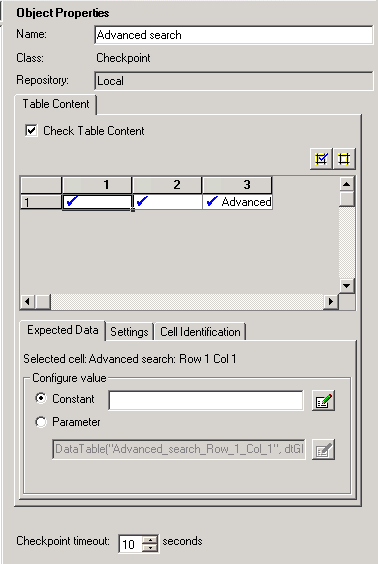
Let's get to it. Say you have a WebTable checkpoint, and you need to edit one or more table fields content. Well, that's a very common task, right? Applications change and you have to maintain your script with up-to-date system information. If you're like me, this screen is printed in your retina, as we have to visit on a daily-basis.
Turns out that I found a very stupid bug that makes QTP crashes here.
Under "Configure value" area, select "Constant" option and focus the edit field to the right. Now, press Tab key twice and watch QTP stop responding.
Bye, bye QTP. See you again after the Control + Alt + Del.
Workaround: avoid the steps described above.
Let's get to it. Say you have a WebTable checkpoint, and you need to edit one or more table fields content. Well, that's a very common task, right? Applications change and you have to maintain your script with up-to-date system information. If you're like me, this screen is printed in your retina, as we have to visit on a daily-basis.
Turns out that I found a very stupid bug that makes QTP crashes here.
Under "Configure value" area, select "Constant" option and focus the edit field to the right. Now, press Tab key twice and watch QTP stop responding.
Bye, bye QTP. See you again after the Control + Alt + Del.
Workaround: avoid the steps described above.
sexta-feira, 18 de janeiro de 2013
[BUG] Multiple small issues
This time I decided to post several small issues I face every day at my work in a single post on this blog, just to make it easier for myself and for the sake of simplicity. This post is much larger than the previous ones, but separately they wouldn't be worth mentioning.
Add description property screen is always small: this is certainly a developer laziness issue. The screen 'Add Property' in Object Repository window do not record its size and position when exiting. So, EVERY TIME you have to re-size it. Annoying!
Object repository window doesn't re-sizes correctly: when editing a table checkpoint (and a few other objects I can't recall), here is what happens when you re-sizes the window. Controls at the right side are not re-sized accordingly. It's a REAL PAIN to edit the cell contents.
Also (1), you may notice that fields under 'Configure value' section are disabled. This is due a bug where Alt-Tab'ing out from this window, makes the fields to become disabled.Hell Who knows why...
Also (2), after re-sizing controls in this window (and making it better to work with), when you exit and re-open it all controls will be reset to its default positions. And that SUCKS A LOT!
Random crashes: seriously, who NEVER EVER suffered a single crash during QTP execution or (more commonly) after closing it down? Usually, when you start experiencing weird QTP behavior after hours and hours of work, close it down and you will get one of these. Below, follows an example.
Code auto-complete is more like a pain in theass back: usually, when well implemented, the auto-complete functionality is VERY useful, since no one remembers all functions, variables and object names all the time. Also reduces typing and typos. But frequently, auto-completed in QTP just stays in your way. It only comes out in few opportunities, and doesn't really bring you what you want.
Jump to step doesn't always work: one good feature from Results Viewer app is the "Jump to Step" option. On (almost) every step recorded in the test result, you can right click it and choose "Jump to Step in QTP" to automatically switch to QTP in the exact line executed, but for some strange reasons, some steps are not 'jumpable'.
I can't determine why it happens (perhaps it's a step executed from inside a function on a Function Library, I don't know), but for whatever reason it's another hugefucking developer laziness.
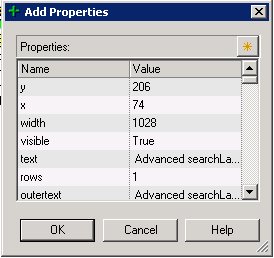
Add description property screen is always small: this is certainly a developer laziness issue. The screen 'Add Property' in Object Repository window do not record its size and position when exiting. So, EVERY TIME you have to re-size it. Annoying!
Object repository window doesn't re-sizes correctly: when editing a table checkpoint (and a few other objects I can't recall), here is what happens when you re-sizes the window. Controls at the right side are not re-sized accordingly. It's a REAL PAIN to edit the cell contents.
Also (1), you may notice that fields under 'Configure value' section are disabled. This is due a bug where Alt-Tab'ing out from this window, makes the fields to become disabled.
Also (2), after re-sizing controls in this window (and making it better to work with), when you exit and re-open it all controls will be reset to its default positions. And that SUCKS A LOT!
Random crashes: seriously, who NEVER EVER suffered a single crash during QTP execution or (more commonly) after closing it down? Usually, when you start experiencing weird QTP behavior after hours and hours of work, close it down and you will get one of these. Below, follows an example.
Code auto-complete is more like a pain in the
Jump to step doesn't always work: one good feature from Results Viewer app is the "Jump to Step" option. On (almost) every step recorded in the test result, you can right click it and choose "Jump to Step in QTP" to automatically switch to QTP in the exact line executed, but for some strange reasons, some steps are not 'jumpable'.
I can't determine why it happens (perhaps it's a step executed from inside a function on a Function Library, I don't know), but for whatever reason it's another huge
[BUG] Columns in the datatable with the same name
Well, according to one of the QTP premises, you cannot include two columns with the same name in the DataTable. Make sense since you can't have two parameters with the same name. But I've found a crack in this wall.
Start a new test. Rename the column A to other name (say 'test'). Click the column 'test' to select it, right click and select Edit --> Insert. QTP will insert a column named 'A', Right click the column 'A', Edit --> Insert and you will get ANOTHER column 'A'.
Just out my curiosity, debugging what happens when asking for column 'A', QTP returns the value from the first column found.
[BUG] Active screen (not so active)
Oh my, the active screens! Another brilliant idea turned into crap with an awful implementation.
Basically, every step you capture using the the "Record" button, generate a few things in your test: respective objects in the repository, a line of code in your test, checkpoints (if that's the case) and screen captures, for you to review the screen and objects appearance by the time you captured them.
Cool, right? But no.
Every screen captured is associated to the line where it was associated, and not to the object itself. I know it sounds weird, but you can make a simple test to prove this.
Capture two objects (say two links) in the same page. The screen captures will look OK.
Now, manually swap the name of the links in your code and check the Active Screen again. It didn't swap accordingly!
[BUG] Object Properties doesn't work in the code when an object has RegExp
Another very handy feature in QTP is that you can right over your code, where you have a Browser(...).Page(...).Link(...) object and choose "Object properties" option, which shows you a small screen to view its properties and a button to take directly into the Objects Repository, with your object selected.
Well, in QTP nothing can be too good.
Say in our example above, the .Link(...) has a regular expression such as .Link("text:=Search"). In this case, the option "Object Properties" in right click menu will be disabled for objects Browser() and Page() objects. Again, I have no idea why.
And even worse, if your Browser(...).Page(...).Link(...) is part of an IF statement (or any other statement), then this option won't be available at all. No properties will be available for any object.
[BUG] QTP 11 has a bug fix... OH WAIT!
Human beings are capable of adapting to the environment it lives in.
Bringing this sentence to the IT world, it's funny sometimes after countless hours working with the same software we end up getting used to its bugs and issues it has.
QTP is a very good example. Most of the issues I've found (but not all) and posted in this blog have a way to workaround it. And even sometimes we find the somehow useful.
Well, turns out that the ONLY useful bug present in QTP 10 was fixed (so to speak) in QTP 11.
When you open a test in read-only mode, you can't do much to it except (1) run and (2) delete values from the DataTable (this last one is the bug). And this is the point, several times it's useful to open a test and delete a few cells in the DataTable resting assured that they will be intact when you re-open the test. In our tests, we usually have several rows (which represents the test scenarios) in the DataTable and a column called EXECUTE, which indicates if that row must be executed or not. Anything different from "Y" and the row is skipped.
But now, QTP 11 tells you you can't edit the DataTable in read-only mode. Sad.
Bringing this sentence to the IT world, it's funny sometimes after countless hours working with the same software we end up getting used to its bugs and issues it has.
QTP is a very good example. Most of the issues I've found (but not all) and posted in this blog have a way to workaround it. And even sometimes we find the somehow useful.
Well, turns out that the ONLY useful bug present in QTP 10 was fixed (so to speak) in QTP 11.
When you open a test in read-only mode, you can't do much to it except (1) run and (2) delete values from the DataTable (this last one is the bug). And this is the point, several times it's useful to open a test and delete a few cells in the DataTable resting assured that they will be intact when you re-open the test. In our tests, we usually have several rows (which represents the test scenarios) in the DataTable and a column called EXECUTE, which indicates if that row must be executed or not. Anything different from "Y" and the row is skipped.
But now, QTP 11 tells you you can't edit the DataTable in read-only mode. Sad.
quarta-feira, 16 de janeiro de 2013
QTP 11 + critical patches: first impressions
This was meant to be a post to talk and discuss all the new neat features found in QTP 11, but it turns out that I ended up uninstalling QTP 11, rolling back to version 10. And (spoiler alert!) bottom line, I had found only two new features, which.... you know... doesn't make you fall in love for this new version.
Yeah... reality sucks... I know. Don't blame me! Blame HP!
So, you are wondering why I had to rollback to its previous version, right? Lets talk about them.
Yeah... reality sucks... I know. Don't blame me! Blame HP!
So, you are wondering why I had to rollback to its previous version, right? Lets talk about them.
- Most of the problems (not to say all) discussed in this blog were not fixed: I've retested all the issues I know regarding QTP and no one of them were fixed.
- Results Viewer screen is WAAAAAAAAY sluggisher than version 10: this new version brings a redesigned/re-coded from ground up, but turns out that it became too slow. Not sure why.
- No Alt + N feature in Results Viewer: an extremely useful feature present the in the past version is the "find next" feature in Results Viewer, which enables you to jump straight to the "errors" and "warnings" in your results.
- Flex add-in do not recognize objects: not sure if this issue is related to the new QTP version or the Flex add-in, but QTP doesn't recognizes graphs writen in Flex.
- Concurrent licenses issues: the licensing model adopted by most of the companies (one single server to serve all computers), turns to be a pain when you have multiple computers in your network consuming near limit licenses. Sooner or later, one's QTP will start complaining you do not have enough licenses to support all instances in your network. We suspect that Results Viewer app is also consuming licenses from your server, which is total/super/hyper/mega shame.
A very short set of feature were added in the version 11.
- Compatibility with new browsers (Firefox and Chrome): I haven't used it, so it's not relevant to me; if that's your case, I wish you good luck.
- New Report Viewer program: already posted my impressions regarding it; it seems to be a little better overall... but no.
- New Regular Expression evaluator: maybe this is the ONLY useful feature in QTP 11 that make me state "cool!", but it's not enough to keep the charm on me.
- New options in Object Spy detection screen: instead of having only the finger-pointed button, now we also have a "highlight in application", "add new object" and "copy obj properties to clipboard" button. They are handy... but very little improvement for a major release.
Soon I will be posting several enhancement tips QTP definitely deserves.
sexta-feira, 4 de janeiro de 2013
[BUG] Datatable with no memory (fixed in QTP11)
Can you tell me how many typing mistakes you made in your live? Probably, countless times a day, right?
Well, don't feel bad! It's absolutely normal, every human being makes mistakes. What differentiate us from other animals and machines (and QTP, I might add), is the fact that we learn with our mistakes and evolve towards excellence.
I know you saw that coming, and you are correct in your expectations: the datatable pane DOES NOT allow you to undo editing. No Ctrl+Z, no right-click menu option, no nothing. Bear with me, you must have a copy of your precious datatable (if that's the case), cause if you accidentally type anything over a filled cell, I'm sorry for you!
Workaround: (1) be very careful to not mistype inside the datatable, (2) have periodical backups of your script, or (3) enable version control (in Quality Center or any sort) for your script. Other than that: I'm sorry for you!
Well, don't feel bad! It's absolutely normal, every human being makes mistakes. What differentiate us from other animals and machines (and QTP, I might add), is the fact that we learn with our mistakes and evolve towards excellence.
I know you saw that coming, and you are correct in your expectations: the datatable pane DOES NOT allow you to undo editing. No Ctrl+Z, no right-click menu option, no nothing. Bear with me, you must have a copy of your precious datatable (if that's the case), cause if you accidentally type anything over a filled cell, I'm sorry for you!
Workaround: (1) be very careful to not mistype inside the datatable, (2) have periodical backups of your script, or (3) enable version control (in Quality Center or any sort) for your script. Other than that: I'm sorry for you!
terça-feira, 16 de outubro de 2012
[BUG] Known issues between QTP and IBM DB2
Well, it's not new the fact that some softwares do not behave well when in contact with other softwares, when running in the same box, specially when we have a multi-company mix of flavours and versions. Raise your hand if you never had issues running a software that required a minimum version of .NET Framework (3, 3.5, 4+) or Java RE (5, 6, 7+).
I personally work for an US based company, which uses QTP environment for its automated regression tests runs and IBM DB2 as main database server. And to access this database mainframe, it's required to have an IBM client software (which is the standard method to access databases of any kind).
Today, me and my coworker realized that after some QTP 10/11 installs and uninstalls (can't tell the exactly moment), QTP intentionally changed some DB2 software initialization parameters. Can you believe that? That change made most of the DB2 software not to work, as described in the following IBM article.
http://www-01.ibm.com/support/docview.wss?uid=swg21517110
No further comments.
I personally work for an US based company, which uses QTP environment for its automated regression tests runs and IBM DB2 as main database server. And to access this database mainframe, it's required to have an IBM client software (which is the standard method to access databases of any kind).
Today, me and my coworker realized that after some QTP 10/11 installs and uninstalls (can't tell the exactly moment), QTP intentionally changed some DB2 software initialization parameters. Can you believe that? That change made most of the DB2 software not to work, as described in the following IBM article.
http://www-01.ibm.com/support/docview.wss?uid=swg21517110
No further comments.
quinta-feira, 11 de outubro de 2012
[BUG] Can't tocuh this!
I swear I thought about a better title for this post, but I failed. Period. Maybe I'm just not in a good day.
So, straight to the point, QTP has a bug in the code editor. When you are typing a sentence you CAN'T hold the SHIFT key and press SPACE bar at the same time. The expected result is that the editor will insert an empty space in your code, but instead it DOES NOTHING.Fucking Freaking nothing. Nothing et al, niente, nix, zero, nada.
So, bottom line, it's very small but annoying like hell bug in the editor.
WORKAROUND: Hit Caps Lock key or just release the SHIFT key before hitting SPACE bar.
So, straight to the point, QTP has a bug in the code editor. When you are typing a sentence you CAN'T hold the SHIFT key and press SPACE bar at the same time. The expected result is that the editor will insert an empty space in your code, but instead it DOES NOTHING.
So, bottom line, it's very small but annoying like hell bug in the editor.
WORKAROUND: Hit Caps Lock key or just release the SHIFT key before hitting SPACE bar.
terça-feira, 25 de setembro de 2012
[BUG] Missing lines? We have free extra lines!
This time, a very simple and stupid bug.
Every once in while, when you save your test, QTP gently adds blank lines at the bottom of the current action code. For no reason (well, maybe to troll you - who knows?).
Workaround: manually delete these lines.
terça-feira, 4 de setembro de 2012
[BUG] Yet another missing feature between QTP 10 and 11
Here we go again. Same blah-blah-blah as before. Seems like no one tests the testing tool, except the users.
This time, working with Flex objects, I figured out that QTP 11 and Flex add-in 4.0.0 can't handle bitmap checkpoints. When capturing the mentioned checkpoint, you get a "Unspecified error". Can you believe it? No? So check this out:
Moreover, if you run a bitmap checkpoint of a test previously recorded on QTP 10 (where these things actually work), QTP 11 displays an "Object not visible" error.
Sorry, no screenshots this time.
Could it be more frustrating?
[BUG] Function Browser().FullScreen() is not working in QTP 11
Simply put. Function Browser().FullScreen() is not working in QTP 11.
Every time I try the FullScreen() command, I get a "General run error". As if a "General" would have "errors" during his daily "runs". #worst_joke_ever
Nothing else to say.
Every time I try the FullScreen() command, I get a "General run error". As if a "General" would have "errors" during his daily "runs". #worst_joke_ever
Nothing else to say.
[BUG] When did an error is actually expeted? (UPDATED!)
Honestly, no errors should be expected in any application, right? Everything should work flawlessly. But in the real world this is not what happens.
Not even with QTP.
Yesterday, I tried to check out an Object Repository (aka OR) from Quality Center which was not checked out to any one, when I came across something unexpected.
Let's be honest. What good does an error message like these ones do? No answer is required.
Well, let me tell you that I tried several different approaches to fix this problem, all in vain. Closed QTP up and restarted it. Didn't work. Closed all programs, restarted my computer. Didn't work.
Turns out that my coworker edited the same OR few minutes before me, and did the check out/check in normally. After the fact, I tried to check it out on my PC and ended up with these error messages.
Solution: **apparently** what happened is that my coworker's QTP silently crashed after editing the OR and didn't freed it up correctly. When closing his QTP down, it displayed a memory leak problem which as probably the main problem.
After making sure his QTP was a 100% dead on his PC, the OR was MAGICALLY available for checkouts as expected.
#facepalm.
UPDATE: a new message (or not) was reported by my coworker, on QTP 11. I swear, this is NOT fake!
Not even with QTP.
Yesterday, I tried to check out an Object Repository (aka OR) from Quality Center which was not checked out to any one, when I came across something unexpected.
Let's be honest. What good does an error message like these ones do? No answer is required.
Well, let me tell you that I tried several different approaches to fix this problem, all in vain. Closed QTP up and restarted it. Didn't work. Closed all programs, restarted my computer. Didn't work.
Turns out that my coworker edited the same OR few minutes before me, and did the check out/check in normally. After the fact, I tried to check it out on my PC and ended up with these error messages.
Solution: **apparently** what happened is that my coworker's QTP silently crashed after editing the OR and didn't freed it up correctly. When closing his QTP down, it displayed a memory leak problem which as probably the main problem.
After making sure his QTP was a 100% dead on his PC, the OR was MAGICALLY available for checkouts as expected.
#facepalm.
UPDATE: a new message (or not) was reported by my coworker, on QTP 11. I swear, this is NOT fake!
Marcadores:
check,
error,
object,
out,
qtp,
repository,
unexpected
segunda-feira, 3 de setembro de 2012
[BUG] QTP 10 to 11 migration issues
Yeah folks... moving from QTP 10..0 to 11.0 is not as smooth and seamless as it's supposed to (well, at least HP didn't alarmed it would be).
We have to "test the testing tool" (which answers back my first post - yes, the answer is "us, the users") and make sure that, at least, the basic functionalities we had in the past are still in place (yes, regression test applies for QTP too).
And we found a few features to be out of place. Obviously, unfortunately. After all, it's QTP for someone's sake.
The migration issue example for this post refers to the Datatable, which does not allows you to edit the column titles from QTP 10.0 tests. We opened our tests up, check them out from Quality Center, double clicked the column titles and... nothing happens! Frustrating.
- Why's that? - you ask.
- Who knows! It's QTP! - I answer back.
Workaround: very quick way to fix this is by exporting and re-importing the excelshit sheet into your test.
We have to "test the testing tool" (which answers back my first post - yes, the answer is "us, the users") and make sure that, at least, the basic functionalities we had in the past are still in place (yes, regression test applies for QTP too).
And we found a few features to be out of place. Obviously, unfortunately. After all, it's QTP for someone's sake.
The migration issue example for this post refers to the Datatable, which does not allows you to edit the column titles from QTP 10.0 tests. We opened our tests up, check them out from Quality Center, double clicked the column titles and... nothing happens! Frustrating.
- Why's that? - you ask.
- Who knows! It's QTP! - I answer back.
Workaround: very quick way to fix this is by exporting and re-importing the excel
- Right click on the Datatable, choose File --> Export... and then Yes button.
- Save wherever you want in your PC, edit it if required (but don't mess it up!), save, close.
- Now, go back to QTP and right click the Datatable, choose File --> Import From File and choose the file you saved previously.
- Click OK on whatever message QTP shows you.
sexta-feira, 31 de agosto de 2012
[BUG] You can't edit your test because it's been checked out by... YOU." WHAT?!?!?
Wait a second, I can't edit my own test that has been checked out by me in QTP?? What the fuck heck?
Yes my friends, that's the ugly truth.
QTP has a VERY inconvenient bug which makes a test checked out on HP Quality Center by you, to be blocked for editing from you. Get it? You can't edit your own test. Crazy! You should ALWAYS be able to edit the test you checked out, unless you open it on a different computer, during a check out.
This annoying error happens every time you check any of your tests out from Quality Center. In the middle of your hard work, QTP awfully crashes, closes and leaves you with no other option but to redo all the work you've done up to the last Ctrl+S you typed.
And this is not the only problem. QTP won't let you edit your own test for the next 10~15 minutes time frame. Can you believe it?
Workarounds: there are two major workarounds applied to this issue.
Yes my friends, that's the ugly truth.
QTP has a VERY inconvenient bug which makes a test checked out on HP Quality Center by you, to be blocked for editing from you. Get it? You can't edit your own test. Crazy! You should ALWAYS be able to edit the test you checked out, unless you open it on a different computer, during a check out.
This annoying error happens every time you check any of your tests out from Quality Center. In the middle of your hard work, QTP awfully crashes, closes and leaves you with no other option but to redo all the work you've done up to the last Ctrl+S you typed.
And this is not the only problem. QTP won't let you edit your own test for the next 10~15 minutes time frame. Can you believe it?
Wait a sec, QTP crashed for no reason and I am the one who gets punished? Fuck! Not fair!
Workarounds: there are two major workarounds applied to this issue.
- Wait for a 10~15minutes timeout from QC or QTP (I couldn't identify which one), and then re-open your test as nothing had happened. QTP will not tell your test is locked by you anymore.
- But if you have no time to waste, then create a copy of your test in QC using the Save As option, renaming your test to a different name. The major drawback of this approach is that you lose all the versions history and all the results in Quality Center, as it will consider this as a new test, not the same one you had.
Hint: save your test every so often. And I'm talking about every 1 minute, max. Trust me, you won't regret it.
Assinar:
Postagens (Atom)