Mostrando postagens com marcador frustration. Mostrar todas as postagens

quarta-feira, 16 de janeiro de 2013

QTP 11 + critical patches: first impressions

This was meant to be a post to talk and discuss all the new neat features found in QTP 11, but it turns out that I ended up uninstalling QTP 11, rolling back to version 10. And (spoiler alert!) bottom line, I had found only two new features, which.... you know... doesn't make you fall in love for this new version.

Yeah... reality sucks... I know. Don't blame me! Blame HP!

So, you are wondering why I had to rollback to its previous version, right? Lets talk about them.
  1. Most of the problems (not to say all) discussed in this blog were not fixed: I've retested all the issues I know regarding QTP and no one of them were fixed.
  2. Results Viewer screen is WAAAAAAAAY sluggisher than version 10: this new version brings a redesigned/re-coded from ground up, but turns out that it became too slow. Not sure why.
  3. No Alt + N feature in Results Viewer: an extremely useful feature present the in the past version is the "find next" feature in Results Viewer, which enables you to jump straight to the "errors" and "warnings" in your results.
  4. Flex add-in do not recognize objects: not sure if this issue is related to the new QTP version or the Flex add-in, but QTP doesn't recognizes graphs writen in Flex.
  5. Concurrent licenses issues: the licensing model adopted by most of the companies (one single server to serve all computers), turns to be a pain when you have multiple computers in your network consuming near limit licenses. Sooner or later, one's QTP will start complaining you do not have enough licenses to support all instances in your network. We suspect that Results Viewer app is also consuming licenses from your server, which is total/super/hyper/mega shame.
A very short set of feature were added in the version 11.
  1. Compatibility with new browsers (Firefox and Chrome): I haven't used it, so it's not relevant to me; if that's your case, I wish you good luck.
  2. New Report Viewer program: already posted my impressions regarding it; it seems to be a little better overall... but no.
  3. New Regular Expression evaluator: maybe this is the ONLY useful feature in QTP 11 that make me state "cool!", but it's not enough to keep the charm on me.
  4. New options in Object Spy detection screen: instead of having only the finger-pointed button, now we also have a "highlight in application", "add new object" and "copy obj properties to clipboard" button. They are handy... but very little improvement for a major release.
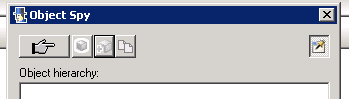
Long story short, bugs from previous version still pledge QTP 11, and lack of enhancements are all around.
Soon I will be posting several enhancement tips QTP definitely deserves.

sexta-feira, 4 de janeiro de 2013

[BUG] Datatable with no memory (fixed in QTP11)

Can you tell me how many typing mistakes you made in your live? Probably, countless times a day, right?

Well, don't feel bad! It's absolutely normal, every human being makes mistakes. What differentiate us from other animals and machines (and QTP, I might add), is the fact that we learn with our mistakes and evolve towards excellence.

I know you saw that coming, and you are correct in your expectations: the datatable pane DOES NOT allow you to undo editing. No Ctrl+Z, no right-click menu option, no nothing. Bear with me, you must have a copy of your precious datatable (if that's the case), cause if you accidentally type anything over a filled cell, I'm sorry for you!

Workaround: (1) be very careful to not mistype inside the datatable, (2) have periodical backups of your script, or (3) enable version control (in Quality Center or any sort) for your script. Other than that: I'm sorry for you!

terça-feira, 16 de outubro de 2012

[BUG] Known issues between QTP and IBM DB2

Well, it's not new the fact that some softwares do not behave well when in contact with other softwares, when running in the same box, specially when we have a multi-company mix of flavours and versions. Raise your hand if you never had issues running a software that required a minimum version of .NET Framework (3, 3.5, 4+) or Java RE (5, 6, 7+).


I personally work for an US based company, which uses QTP environment for its automated regression tests runs and IBM DB2 as main database server. And to access this database mainframe, it's required to have an IBM client software (which is the standard method to access databases of any kind).


Today, me and my coworker realized that after some QTP 10/11 installs and uninstalls (can't tell the exactly moment), QTP intentionally changed some DB2 software initialization parameters. Can you believe that? That change made most of the DB2 software not to work, as described in the following IBM article.

http://www-01.ibm.com/support/docview.wss?uid=swg21517110

No further comments.

quinta-feira, 11 de outubro de 2012

[BUG] Can't tocuh this!

I swear I thought about a better title for this post, but I failed. Period. Maybe I'm just not in a good day.

So, straight to the point, QTP has a bug in the code editor. When you are typing a sentence you CAN'T hold the SHIFT key and press SPACE bar at the same time. The expected result is that the editor will insert an empty space in your code, but instead it DOES NOTHING. Fucking Freaking nothing. Nothing et al, niente, nix, zero, nada.

So, bottom line, it's very small but annoying like hell bug in the editor.

WORKAROUND: Hit Caps Lock key or just release the SHIFT key before hitting SPACE bar.

terça-feira, 25 de setembro de 2012

[BUG] Missing lines? We have free extra lines!

This time, a very simple and stupid bug.

Every once in while, when you save your test, QTP gently adds blank lines at the bottom of the current action code. For no reason (well, maybe to troll you - who knows?).


Workaround: manually delete these lines.

quarta-feira, 29 de agosto de 2012

First things first...

I would like to start this blog with a very simple question: who tests the testing tool? This question sounds just like the "who came first, the chicken or the egg?" question. If you are like me and work in Information Technology (IT) area, you know that all types of software require extensive testing, sometimes requiring the aid of a testing tool to help you test faster and cover more and more testing scenarios. That's when QTP comes in hand.

Software testing has increasingly received more and more importance overtime in IT world, as the software development companies evolve their systems to godzila-size scales. And one of the questions that emerges from this long continuum development cycles is "does this new version/build/release maintain ALL the previous functionalities in place? haven't we brake something that was correctly work before?".

Here is where Regression Testing enters the scene. This type of test serves to help development teams (analysts, developers, testers included) to make sure that working features keep working as expected in the next to-be-released system versions, because the focus is to test already-in-place functions (not the new ones).

I personally work on one of these software development companies, particularly in software testing automation area, and I was hired mainly due to my previous 2 years experience working with QTP on a global technology company. Back at that time, I had the chance to work with versions 8.2 and 9.1. Now the challenge was to face QTP 10.0 and - since last week - 11.0 plus latest critical patches.

And for the past two years, I've been struggling with QTP. Seriously, everyday is like a battle against this tool. Bugs, crashes and lack of useful features mine this software's usability on a daily basis. So I thought "why not build a blog and post all the shit problems we face on the internet and let other people (aka automators) know and share their experiences? maybe - if I'm EXTREMELY lucky - HP will take the blame and fix these issues once and for all?" Sound like good reasons, right? Well, they do to me and here I am.

But, back to my main question, who tests the testing tool?

Sometimes I feel like no one gives a shit penny for this tool at HP and I will show why. Or probably, this is one of those projects no one ever dares to touch and prays to stay as far as possible from it. And that's what I will mainly cover in this blog - all the problems my team faces when using QTP with a good amount of humor. And to be fairly honest, I probably know more about QTP itself than any HP developer does.

Hope you enjoy reading it and have some fun, just like I do reporting these issues. :)
Feel free to leave your comments and - mainly - share your personal frustrations with this tool.