Wow, another post that took me a while to find a good title.
Yet another QTP issue which forces you to close it down and open it up all the way. Nothing else much to say regarding this, the screenshot is self explanatory.
Thanks to my coworker for the screenshot.
Yeah, you've read it right. If you ever used HP QuickTest Professional (or simply QTP) software, you know what to expect from this blog. A full list of all sorts of bugs we ever found in QTP (aka probably the worst commercial software ever seen).
Mostrando postagens com marcador 11. Mostrar todas as postagens
quarta-feira, 19 de junho de 2013
sexta-feira, 18 de janeiro de 2013
[BUG] QTP 11 has a bug fix... OH WAIT!
Human beings are capable of adapting to the environment it lives in.
Bringing this sentence to the IT world, it's funny sometimes after countless hours working with the same software we end up getting used to its bugs and issues it has.
QTP is a very good example. Most of the issues I've found (but not all) and posted in this blog have a way to workaround it. And even sometimes we find the somehow useful.
Well, turns out that the ONLY useful bug present in QTP 10 was fixed (so to speak) in QTP 11.
When you open a test in read-only mode, you can't do much to it except (1) run and (2) delete values from the DataTable (this last one is the bug). And this is the point, several times it's useful to open a test and delete a few cells in the DataTable resting assured that they will be intact when you re-open the test. In our tests, we usually have several rows (which represents the test scenarios) in the DataTable and a column called EXECUTE, which indicates if that row must be executed or not. Anything different from "Y" and the row is skipped.
But now, QTP 11 tells you you can't edit the DataTable in read-only mode. Sad.
Bringing this sentence to the IT world, it's funny sometimes after countless hours working with the same software we end up getting used to its bugs and issues it has.
QTP is a very good example. Most of the issues I've found (but not all) and posted in this blog have a way to workaround it. And even sometimes we find the somehow useful.
Well, turns out that the ONLY useful bug present in QTP 10 was fixed (so to speak) in QTP 11.
When you open a test in read-only mode, you can't do much to it except (1) run and (2) delete values from the DataTable (this last one is the bug). And this is the point, several times it's useful to open a test and delete a few cells in the DataTable resting assured that they will be intact when you re-open the test. In our tests, we usually have several rows (which represents the test scenarios) in the DataTable and a column called EXECUTE, which indicates if that row must be executed or not. Anything different from "Y" and the row is skipped.
But now, QTP 11 tells you you can't edit the DataTable in read-only mode. Sad.
quarta-feira, 16 de janeiro de 2013
QTP 11 + critical patches: first impressions
This was meant to be a post to talk and discuss all the new neat features found in QTP 11, but it turns out that I ended up uninstalling QTP 11, rolling back to version 10. And (spoiler alert!) bottom line, I had found only two new features, which.... you know... doesn't make you fall in love for this new version.
Yeah... reality sucks... I know. Don't blame me! Blame HP!
So, you are wondering why I had to rollback to its previous version, right? Lets talk about them.
Yeah... reality sucks... I know. Don't blame me! Blame HP!
So, you are wondering why I had to rollback to its previous version, right? Lets talk about them.
- Most of the problems (not to say all) discussed in this blog were not fixed: I've retested all the issues I know regarding QTP and no one of them were fixed.
- Results Viewer screen is WAAAAAAAAY sluggisher than version 10: this new version brings a redesigned/re-coded from ground up, but turns out that it became too slow. Not sure why.
- No Alt + N feature in Results Viewer: an extremely useful feature present the in the past version is the "find next" feature in Results Viewer, which enables you to jump straight to the "errors" and "warnings" in your results.
- Flex add-in do not recognize objects: not sure if this issue is related to the new QTP version or the Flex add-in, but QTP doesn't recognizes graphs writen in Flex.
- Concurrent licenses issues: the licensing model adopted by most of the companies (one single server to serve all computers), turns to be a pain when you have multiple computers in your network consuming near limit licenses. Sooner or later, one's QTP will start complaining you do not have enough licenses to support all instances in your network. We suspect that Results Viewer app is also consuming licenses from your server, which is total/super/hyper/mega shame.
A very short set of feature were added in the version 11.
- Compatibility with new browsers (Firefox and Chrome): I haven't used it, so it's not relevant to me; if that's your case, I wish you good luck.
- New Report Viewer program: already posted my impressions regarding it; it seems to be a little better overall... but no.
- New Regular Expression evaluator: maybe this is the ONLY useful feature in QTP 11 that make me state "cool!", but it's not enough to keep the charm on me.
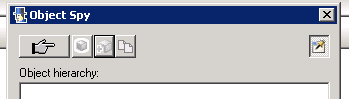
- New options in Object Spy detection screen: instead of having only the finger-pointed button, now we also have a "highlight in application", "add new object" and "copy obj properties to clipboard" button. They are handy... but very little improvement for a major release.
Soon I will be posting several enhancement tips QTP definitely deserves.
terça-feira, 4 de setembro de 2012
[BUG] Yet another missing feature between QTP 10 and 11
Here we go again. Same blah-blah-blah as before. Seems like no one tests the testing tool, except the users.
This time, working with Flex objects, I figured out that QTP 11 and Flex add-in 4.0.0 can't handle bitmap checkpoints. When capturing the mentioned checkpoint, you get a "Unspecified error". Can you believe it? No? So check this out:
Moreover, if you run a bitmap checkpoint of a test previously recorded on QTP 10 (where these things actually work), QTP 11 displays an "Object not visible" error.
Sorry, no screenshots this time.
Could it be more frustrating?
[BUG] Function Browser().FullScreen() is not working in QTP 11
Simply put. Function Browser().FullScreen() is not working in QTP 11.
Every time I try the FullScreen() command, I get a "General run error". As if a "General" would have "errors" during his daily "runs". #worst_joke_ever
Nothing else to say.
Every time I try the FullScreen() command, I get a "General run error". As if a "General" would have "errors" during his daily "runs". #worst_joke_ever
Nothing else to say.
Assinar:
Postagens (Atom)
