Mostrando postagens com marcador bug. Mostrar todas as postagens

sexta-feira, 16 de agosto de 2013

[BUG] Report viewer cut off

Not a good day, today. So I'm gonna be as quick as I can.

Another very annoying bug in QTP, this time in the Results Viewer application. Every time you have extensive text checkpoints and you need to check why it has failed, Results Viewer displays both the expected and actual results, so you can visually see what's gone wrong.

Well, turns out that Results Viewer cuts off part of the actual text, as there were some sort of limitation in the text length. This way, we can't be clearly sure what happened to your checkpoint.

I know the screenshot below is not the best example as I had to blur out the text under "Property Value". What you see with a white background is your expected string, whereas the one in red and gray background is the actual text displayed in your application.

You can clearly see that there's a major size discrepancy.


Workaround: as usual, I have to copy the actual text in red, copy the expected text from the checkpoint (inside Objects Repository), put it altogether in a text editor and do the comparison myself. Sometimes I even use websites like DiffNow.

quarta-feira, 19 de junho de 2013

[BUG] Bad, bad object repository

I've been reluctant in the past few weeks to publish this bug, but I decided to do it anyway. I haven't been able to track exactly how to reproduce the issue, but I see it happening on a daily basis. Here it goes:

The famous and extensively used Object Repository (aka OR) has a major series of bugs (already demonstrated in this blog). This feature has a huge play in QTP utilization, and is a crucial feature in this tool. Can't believe it's so buggy.

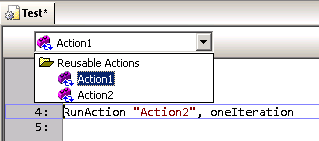
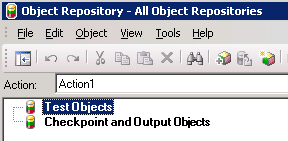
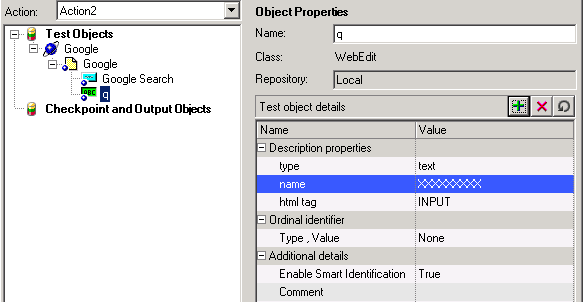
Inside the OR window, there's a dropdown list where you can select which action you want to edit the containing objects. Turns out that, if you change to another that is different from the current one on QTP window, the OR (or QTP itself - who knows?) doesn't save the changes you make. Fuck! Oh boy!


After following the steps above, all changes you made are not saved.

Workaround: Well, there nothing much to do about it, except to close the OR window, switch to the correct action in QTP and re-open the OR window. By doing so, you guarantee that the objects/checkpoint/etc you edit will be correctly updated and saved.

sexta-feira, 18 de janeiro de 2013

[BUG] Multiple small issues

This time I decided to post several small issues I face every day at my work in a single post on this blog, just to make it easier for myself and for the sake of simplicity. This post is much larger than the previous ones, but separately they wouldn't be worth mentioning.

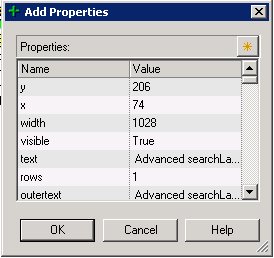
Add description property screen is always small: this is certainly a developer laziness issue. The screen 'Add Property' in Object Repository window do not record its size and position when exiting. So, EVERY TIME you have to re-size it. Annoying!


Object repository window doesn't re-sizes correctly: when editing a  table checkpoint (and a few other objects I can't recall), here is what happens when you re-sizes the window. Controls at the right side are not re-sized accordingly. It's a REAL PAIN to edit the cell contents.


Also (1), you may notice that fields under 'Configure value' section are disabled. This is due a bug where Alt-Tab'ing out from this window, makes the fields to become disabled. Hell Who knows why...

Also (2), after re-sizing controls in this window (and making it better to work with), when you exit and re-open it all controls will be reset to its default positions. And that SUCKS A LOT!


Random crashes: seriously, who NEVER EVER suffered a single crash during QTP execution or (more commonly) after closing it down? Usually, when you start experiencing weird QTP behavior after hours and hours of work, close it down and you will get one of these. Below, follows an example.


Code auto-complete is more like a pain in the ass back: usually, when well implemented, the auto-complete functionality is VERY useful, since no one remembers all functions, variables and object names all the time. Also reduces typing and typos. But frequently, auto-completed in QTP just stays in your way. It only comes out in few opportunities, and doesn't really bring you what you want.


Jump to step doesn't always work: one good feature from Results Viewer app is the "Jump to Step" option. On (almost) every step recorded in the test result, you can right click it and choose "Jump to Step in QTP" to automatically switch to QTP in the exact line executed, but for some strange reasons, some steps are not 'jumpable'.


I can't determine why it happens (perhaps it's a step executed from inside a function on a Function Library, I don't know), but for whatever reason it's another huge fucking developer laziness.

[BUG] Columns in the datatable with the same name


Well, according to one of the QTP premises, you cannot include two columns with the same name in the DataTable. Make sense since you can't have two parameters with the same name. But I've found a crack in this wall.

Start a new test. Rename the column A to other name (say 'test'). Click the column 'test' to select it, right click and select Edit --> Insert. QTP will insert a column named 'A', Right click the column 'A', Edit --> Insert and you will get ANOTHER column 'A'.


Just out my curiosity, debugging what happens when asking for column 'A', QTP returns the value from the first column found.

[BUG] Active screen (not so active)


Oh my, the active screens! Another brilliant idea turned into crap with an awful implementation.

Basically, every step you capture using the the "Record" button, generate a few things in your test: respective objects in the repository, a line of code in your test, checkpoints (if that's the case) and screen captures, for you to review the screen and objects appearance by the time you captured them.

Cool, right? But no.

Every screen captured is associated to the line where it was associated, and not to the object itself. I know it sounds weird, but you can make a simple test to prove this.

Capture two objects (say two links) in the same page. The screen captures will look OK.


Now, manually swap the name of the links in your code and check the Active Screen again. It didn't swap accordingly!

[BUG] QTP 11 has a bug fix... OH WAIT!

Human beings are capable of adapting to the environment it lives in.

Bringing this sentence to the IT world, it's funny sometimes after countless hours working with the same software we end up getting used to its bugs and issues it has.

QTP is a very good example. Most of the issues I've found (but not all) and posted in this blog have a way to workaround it. And even sometimes we find the somehow useful.

Well, turns out that the ONLY useful bug present in QTP 10 was fixed (so to speak) in QTP 11.

When you open a test in read-only mode, you can't do much to it except (1) run and (2) delete values from the DataTable (this last one is the bug). And this is the point, several times it's useful to open a test and delete a few cells in the DataTable resting assured that they will be intact when you re-open the test. In our tests, we usually have several rows (which represents the test scenarios) in the DataTable and a column called EXECUTE, which indicates if that row must be executed or not. Anything different from "Y" and the row is skipped.

But now, QTP 11 tells you you can't edit the DataTable in read-only mode. Sad.

sexta-feira, 31 de agosto de 2012

[BUG] You can't edit your test because it's been checked out by... YOU." WHAT?!?!?

Wait a second, I can't edit my own test that has been checked out by me in QTP?? What the fuck heck?

Yes my friends, that's the ugly truth.

QTP has a VERY inconvenient bug which makes a test checked out on HP Quality Center by you, to be blocked for editing from you. Get it? You can't edit your own test. Crazy! You should ALWAYS be able to edit the test you checked out, unless you open it on a different computer, during a check out.

This annoying error happens every time you check any of your tests out from Quality Center. In the middle of your hard work, QTP awfully crashes, closes and leaves you with no other option but to redo all the work you've done up to the last Ctrl+S you typed.

And this is not the only problem. QTP won't let you edit your own test for the next 10~15 minutes time frame. Can you believe it?

Wait a sec, QTP crashed for no reason and I am the one who gets punished? Fuck! Not fair!

Workarounds: there are two major workarounds applied to this issue.
  1. Wait for a 10~15minutes timeout from QC or QTP (I couldn't identify which one), and then re-open your test as nothing had happened. QTP will not tell your test is locked by you anymore.
  2. But if you have no time to waste, then create a copy of your test in QC using the Save As option, renaming your test to a different name. The major drawback of this approach is that you lose all the versions history and all the results in Quality Center, as it will consider this as a new test, not the same one you had.

Hint: save your test every so often. And I'm talking about every 1 minute, max. Trust me, you won't regret it.

quarta-feira, 29 de agosto de 2012

First things first...

I would like to start this blog with a very simple question: who tests the testing tool? This question sounds just like the "who came first, the chicken or the egg?" question. If you are like me and work in Information Technology (IT) area, you know that all types of software require extensive testing, sometimes requiring the aid of a testing tool to help you test faster and cover more and more testing scenarios. That's when QTP comes in hand.

Software testing has increasingly received more and more importance overtime in IT world, as the software development companies evolve their systems to godzila-size scales. And one of the questions that emerges from this long continuum development cycles is "does this new version/build/release maintain ALL the previous functionalities in place? haven't we brake something that was correctly work before?".

Here is where Regression Testing enters the scene. This type of test serves to help development teams (analysts, developers, testers included) to make sure that working features keep working as expected in the next to-be-released system versions, because the focus is to test already-in-place functions (not the new ones).

I personally work on one of these software development companies, particularly in software testing automation area, and I was hired mainly due to my previous 2 years experience working with QTP on a global technology company. Back at that time, I had the chance to work with versions 8.2 and 9.1. Now the challenge was to face QTP 10.0 and - since last week - 11.0 plus latest critical patches.

And for the past two years, I've been struggling with QTP. Seriously, everyday is like a battle against this tool. Bugs, crashes and lack of useful features mine this software's usability on a daily basis. So I thought "why not build a blog and post all the shit problems we face on the internet and let other people (aka automators) know and share their experiences? maybe - if I'm EXTREMELY lucky - HP will take the blame and fix these issues once and for all?" Sound like good reasons, right? Well, they do to me and here I am.

But, back to my main question, who tests the testing tool?

Sometimes I feel like no one gives a shit penny for this tool at HP and I will show why. Or probably, this is one of those projects no one ever dares to touch and prays to stay as far as possible from it. And that's what I will mainly cover in this blog - all the problems my team faces when using QTP with a good amount of humor. And to be fairly honest, I probably know more about QTP itself than any HP developer does.

Hope you enjoy reading it and have some fun, just like I do reporting these issues. :)
Feel free to leave your comments and - mainly - share your personal frustrations with this tool.