Yes, it's been a very long while I haven't posted anything here. And the reason why this happened is that I had been overwhelmed with work had and no spare time for writing.
We had a major upgrade to UFT 12.51 since a while ago, and recently I started working with web services automation. And, as you would expect, with new UFT feature comes a TON of bugs altogether (holy mama, it's even hard to remember of them from the top of my head!!).
So, next posts will probably be about UFT 12.51 impressions, what's new, what's not, maybe a small tutorial on web services automation, etc. What I can say, as of now, is that don't expect for for great news because there aren't (unfortunately).
Stay tuned!
segunda-feira, 15 de agosto de 2016

sexta-feira, 28 de março de 2014
[BUG] Results Viewer loses results when opening multiple results
As you know, Results Viewer is far from being a good program. No news. So, let's enrich its bug list.
Results Viewer stores the test results in a temporary, so you can temporarily navigate and review what happened in your run. What happens is that, if you keep one result window open and start opening multiple RR instances to review other run results, when you go back to the first RR instance and take back from where you left off, RR will not display the captured screen, result icons, checkpoint details and so on.
No screenshots this time, as I can't make a good example without exposing sensitive date. Sorry.
Results Viewer stores the test results in a temporary, so you can temporarily navigate and review what happened in your run. What happens is that, if you keep one result window open and start opening multiple RR instances to review other run results, when you go back to the first RR instance and take back from where you left off, RR will not display the captured screen, result icons, checkpoint details and so on.
No screenshots this time, as I can't make a good example without exposing sensitive date. Sorry.
[BUG] Bug on the Regular Expression Evaluator screen
As reported by my coworker, here is a new bug report for UFT.
"I found a bug in UFT, version 11.5x, when using the feature “Regular Expression Evaluator”. Please see below.


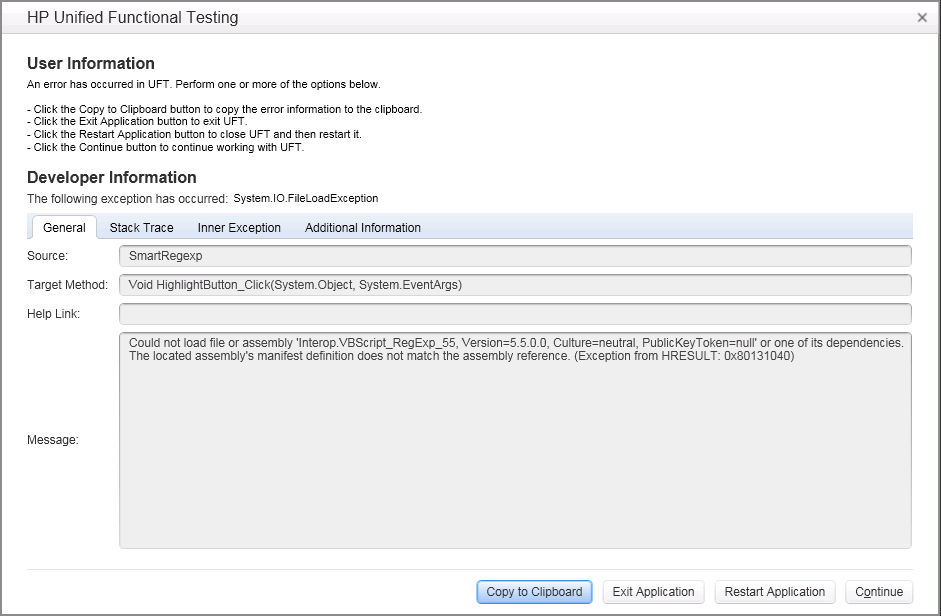
"I found a bug in UFT, version 11.5x, when using the feature “Regular Expression Evaluator”. Please see below.
Steps:
1. Open the Object Repository Manager
2. Open a repository
3. Add a Page object
4. Click on its properties to change the url field
5. Open the Regular Expression Evaluator
6. Edit the expression and click on Highlight button
7. The error occurs."
terça-feira, 25 de março de 2014
[NEWS] Embrace yourselves, UFT 12.00 is coming!
As is stated previously, I had switched to UFT 11.50 not long ago and now HP has just released UFT 12.00. I will probably have my UFT upgraded to this new version. More details on the link below:
http://qainsights.com/hp-uft-12-coming-soon/
Spoiler: no bug fixing announced. :(
http://qainsights.com/hp-uft-12-coming-soon/
Spoiler: no bug fixing announced. :(
quinta-feira, 20 de março de 2014
[NEWS] Finally switched to UFT 11.5! \o/
So, after a very long time in silence I'm back with several news. Some of them are good, most of them are not. Let's head straight to the first impressions.
I'm gonna be honest with you, I switched directly from QTP 10.0 to UFT 11.5 (skipped QTP 11 and all its bugs). QTP 10.0 has it's known bugs and enhancement points (several of them are described here in my blog) but, looking at the bright side, it's fast and (somewhat) reliable. In terms of technology, it's a pretty much dominated piece of software up to this point.
So making the switch to a whole new platform sometimes is a painfull process that we have to go through. I got a new machine running Windows 7, IE9, Chrome 28 and Firefox 24.1 ESR and a little time to settle things down. So, let's take a look on what's been on:
There are a lot more to come. Stay tunned.
I'm gonna be honest with you, I switched directly from QTP 10.0 to UFT 11.5 (skipped QTP 11 and all its bugs). QTP 10.0 has it's known bugs and enhancement points (several of them are described here in my blog) but, looking at the bright side, it's fast and (somewhat) reliable. In terms of technology, it's a pretty much dominated piece of software up to this point.
So making the switch to a whole new platform sometimes is a painfull process that we have to go through. I got a new machine running Windows 7, IE9, Chrome 28 and Firefox 24.1 ESR and a little time to settle things down. So, let's take a look on what's been on:
PROS
New redesigned GUI (but not all screens were not updated)
Good to see we have a new snowy white GUI, instead of the old silver-95sh look. Now UFT looks a lot as a development tool. Too bad that not all minor screens were ported to this new standard.New editor component
Code editor has its slice on the UFT changes. Most of the are for good. Now we can zoom in and out by Ctrl + and Crtl -, no more blank lines at the end of action code, Shift + Space key combination now works as expected, and more.New left side menu (Solution Explorer)
It took me a lot of time to get used to this new control pane, but once you learn how to use it, you won't wish to come back. Direct access to global repository, library functions and Recovery Scenarios are a must.Ctrl+Z on datatable
Can't believe HP actually changed the datatable excel component and this time you can use Control+Z command on its cells. Note: you can use it only once, but at least now you can.Highlight the spying objects
In Spy Objects screen, when you spy any object now you can highlight an specific object at any level in the hierarchy tree. Also, from the Object Spy screen, you can tell UFT to include the selected object into your objects lybrary without having to recapture it in your application.Sync works better
Sync command works better on page objects.Changes to global repositories seem to reflected immediately in your code
Pretty much self-explanatory. It's not a 100% perfect, still has bugs, but it's much better than before.New regular expression evaluator
Now, in case you are not sure if your regular expression will work or not, you can try this new feature called Regular expression evaluator.CONS
Sliding pops-ups windows
Ok, so enough of good things, lets take a look on the bad side. Now, some of the pop-up screen you open slowly slide from top to down, as a unfold effect. Completely unnecessary.Mouse scroll wheel doesn't work on all objects
I can't remember how many places in UFT don't recognize the mouse scroll wheel.Objects repository looks awful
Object repository screen (as well as other screens) hasn't been updated to the new standard, but some parts have white background. So, it looks terrible. All bugs remain from previous QTP versions.Results viewer bugs
Results viewer application is one of the worst parts of UFT bunde. Sluggish, buggy. missing features... all but a good piece of software.Abode Flex doesn't work well
Now things have changed around. UFT is said to support Adobe Flex 4.5 and later. If you want to automate applications using earlier versions of Flex, you have to go back to QTP 10 or 11 with Adobe's add-in. This is not a 100% truth, as I made some tests and UFT is capable of handling older Flex components if you use Windows XP and IE7. Other combination of OS + browser won't work at all.There are a lot more to come. Stay tunned.
terça-feira, 25 de fevereiro de 2014
[OFF] Interesting test automation link
Not sure about you guys, but I use to research quite a lot regarding test automation, QTP/UTF and Selenium topics. One worth mentioning link is the Joe Colantonio web site, with several good articles regarding everything that concerns around test automation.
Now he has released a first initiative to have a podcast about test automation, called TestTalk (here).
Also I usually download QTP/UFT patchs directly from his web site. :)
http://www.joecolantonio.com/
Now he has released a first initiative to have a podcast about test automation, called TestTalk (here).
Also I usually download QTP/UFT patchs directly from his web site. :)
http://www.joecolantonio.com/
sexta-feira, 16 de agosto de 2013
[BUG] Report viewer cut off
Not a good day, today. So I'm gonna be as quick as I can.
Another very annoying bug in QTP, this time in the Results Viewer application. Every time you have extensive text checkpoints and you need to check why it has failed, Results Viewer displays both the expected and actual results, so you can visually see what's gone wrong.
Well, turns out that Results Viewer cuts off part of the actual text, as there were some sort of limitation in the text length. This way, we can't be clearly sure what happened to your checkpoint.
I know the screenshot below is not the best example as I had to blur out the text under "Property Value". What you see with a white background is your expected string, whereas the one in red and gray background is the actual text displayed in your application.
You can clearly see that there's a major size discrepancy.

Workaround: as usual, I have to copy the actual text in red, copy the expected text from the checkpoint (inside Objects Repository), put it altogether in a text editor and do the comparison myself. Sometimes I even use websites like DiffNow.
segunda-feira, 8 de julho de 2013
[BUG] Can't double For using same index variable
Did you get the post title? If not, don't worry, I'm aware of how horrible is sounds.
Truth is, in this case an image speaks better than a thousand words. If you look at the code below, you will understand my point.

If you run this code, you will get this nice error message:

Yep, QTP will complain at you with a sintax error, when you made no mistake.
"Invalid loop control variable"??? This is actually a mere limitation from VB Script language and I know that using the same variable twice on nested FORs is not the best option in programming space, but if your code is wrong it's up to the you (developer) to fix it, not your coding to block you with a sintax error.
WORKAROUND: Don't use the same variable in nested FORs twice or more. Instead, assign the index (variable i) to another variable and loop through it.
Truth is, in this case an image speaks better than a thousand words. If you look at the code below, you will understand my point.
If you run this code, you will get this nice error message:
Yep, QTP will complain at you with a sintax error, when you made no mistake.
"Invalid loop control variable"??? This is actually a mere limitation from VB Script language and I know that using the same variable twice on nested FORs is not the best option in programming space, but if your code is wrong it's up to the you (developer) to fix it, not your coding to block you with a sintax error.
WORKAROUND: Don't use the same variable in nested FORs twice or more. Instead, assign the index (variable i) to another variable and loop through it.
[NEWS] HP UFT is arriving!
The new HP UFT v11.52 (Unified Functional Testing) tool is coming and will arrive soon.
A review will be laid here and hopefully we will see a brand new fully functional automation tool.
A review will be laid here and hopefully we will see a brand new fully functional automation tool.
quinta-feira, 20 de junho de 2013
Woohoo!!!
Today I'm celebrating the 1000th visitor to my blog. I don't know who is he (or she), but I' happy to see that my own humble blog is growing larger (thanks to HP and its awful QTP software) and hopefully helping some people out on QTP bug reporting.

Yay! :)
Thanks to you all! It certainly motivates me to keep writing for this blog.
Yay! :)
Thanks to you all! It certainly motivates me to keep writing for this blog.
quarta-feira, 19 de junho de 2013
[BUG] Catastrophic screenshot!
Wow, another post that took me a while to find a good title.
Yet another QTP issue which forces you to close it down and open it up all the way. Nothing else much to say regarding this, the screenshot is self explanatory.

Thanks to my coworker for the screenshot.
Yet another QTP issue which forces you to close it down and open it up all the way. Nothing else much to say regarding this, the screenshot is self explanatory.
Thanks to my coworker for the screenshot.
[BUG] Bad, bad object repository
I've been reluctant in the past few weeks to publish this bug, but I decided to do it anyway. I haven't been able to track exactly how to reproduce the issue, but I see it happening on a daily basis. Here it goes:
The famous and extensively used Object Repository (aka OR) has a major series of bugs (already demonstrated in this blog). This feature has a huge play in QTP utilization, and is a crucial feature in this tool. Can't believe it's so buggy.
Inside the OR window, there's a dropdown list where you can select which action you want to edit the containing objects. Turns out that, if you change to another that is different from the current one on QTP window, the OR (or QTP itself - who knows?) doesn't save the changes you make.Fuck! Oh boy!
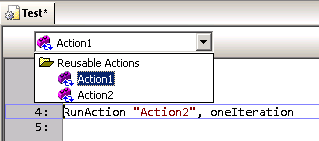
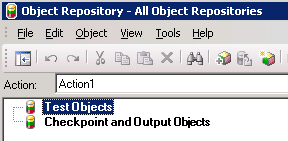

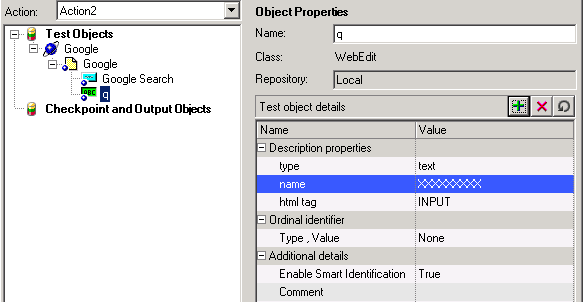
After following the steps above, all changes you made are not saved.
Workaround: Well, there nothing much to do about it, except to close the OR window, switch to the correct action in QTP and re-open the OR window. By doing so, you guarantee that the objects/checkpoint/etc you edit will be correctly updated and saved.
The famous and extensively used Object Repository (aka OR) has a major series of bugs (already demonstrated in this blog). This feature has a huge play in QTP utilization, and is a crucial feature in this tool. Can't believe it's so buggy.
Inside the OR window, there's a dropdown list where you can select which action you want to edit the containing objects. Turns out that, if you change to another that is different from the current one on QTP window, the OR (or QTP itself - who knows?) doesn't save the changes you make.
After following the steps above, all changes you made are not saved.
Workaround: Well, there nothing much to do about it, except to close the OR window, switch to the correct action in QTP and re-open the OR window. By doing so, you guarantee that the objects/checkpoint/etc you edit will be correctly updated and saved.
quinta-feira, 6 de junho de 2013
[BUG] Fasten your seat belts, QTP menu is missing!
Oh boy, yet another shameful bug on QTP. Not much to say this time as you are probably tired of reading the same whining over and over. And I don't feel like joking around. Sorry.
I have absolutely no idea why it happens. It just happens.
From time to time, QTP seems to lose or forget its menu configuration, leaving the user with a very limited amount of options. See examples below.


Workaround: fortunately for us, there a very simple way to make QTP put its menu configurations back in place, where it should never had left.
Right-click anywhere in the menu/buttons area and select Customize.

Next, go over the Toolbars tab and click Restore All button. Confirm and be happy.

Next, I recommend you to close down and restart QTP. Never knows.
I have absolutely no idea why it happens. It just happens.
From time to time, QTP seems to lose or forget its menu configuration, leaving the user with a very limited amount of options. See examples below.
Workaround: fortunately for us, there a very simple way to make QTP put its menu configurations back in place, where it should never had left.
Right-click anywhere in the menu/buttons area and select Customize.
Next, I recommend you to close down and restart QTP. Never knows.
quinta-feira, 14 de março de 2013
[BUG] Successfully failed!
People say that an image worth a thousand words, so here it goes.
My coworker sent me this screenshot, showing the QTP update process result.

My coworker sent me this screenshot, showing the QTP update process result.
I wonder why am I not surprised to see such thing.
sexta-feira, 1 de fevereiro de 2013
[BUG] Tab, tab..... CRASH!
What a great day to find yet another shameful bug in QTP 10. And this time a very quick and dirty one.
Let's get to it. Say you have a WebTable checkpoint, and you need to edit one or more table fields content. Well, that's a very common task, right? Applications change and you have to maintain your script with up-to-date system information. If you're like me, this screen is printed in your retina, as we have to visit on a daily-basis.
Turns out that I found a very stupid bug that makes QTP crashes here.
Under "Configure value" area, select "Constant" option and focus the edit field to the right. Now, press Tab key twice and watch QTP stop responding.
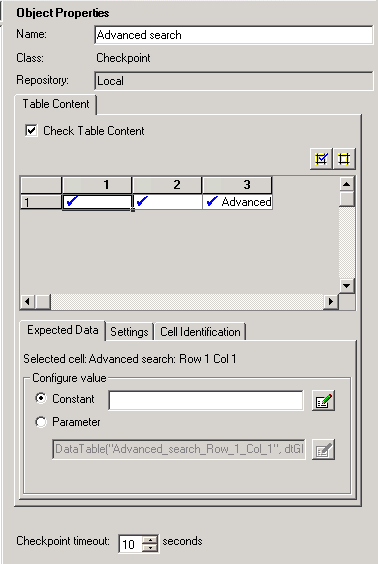
Bye, bye QTP. See you again after the Control + Alt + Del.
Workaround: avoid the steps described above.
Let's get to it. Say you have a WebTable checkpoint, and you need to edit one or more table fields content. Well, that's a very common task, right? Applications change and you have to maintain your script with up-to-date system information. If you're like me, this screen is printed in your retina, as we have to visit on a daily-basis.
Turns out that I found a very stupid bug that makes QTP crashes here.
Under "Configure value" area, select "Constant" option and focus the edit field to the right. Now, press Tab key twice and watch QTP stop responding.
Bye, bye QTP. See you again after the Control + Alt + Del.
Workaround: avoid the steps described above.
sexta-feira, 18 de janeiro de 2013
[BUG] Multiple small issues
This time I decided to post several small issues I face every day at my work in a single post on this blog, just to make it easier for myself and for the sake of simplicity. This post is much larger than the previous ones, but separately they wouldn't be worth mentioning.
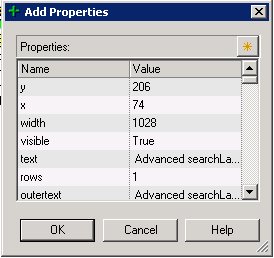
Add description property screen is always small: this is certainly a developer laziness issue. The screen 'Add Property' in Object Repository window do not record its size and position when exiting. So, EVERY TIME you have to re-size it. Annoying!
Object repository window doesn't re-sizes correctly: when editing a table checkpoint (and a few other objects I can't recall), here is what happens when you re-sizes the window. Controls at the right side are not re-sized accordingly. It's a REAL PAIN to edit the cell contents.

Also (1), you may notice that fields under 'Configure value' section are disabled. This is due a bug where Alt-Tab'ing out from this window, makes the fields to become disabled.Hell Who knows why...
Also (2), after re-sizing controls in this window (and making it better to work with), when you exit and re-open it all controls will be reset to its default positions. And that SUCKS A LOT!
Random crashes: seriously, who NEVER EVER suffered a single crash during QTP execution or (more commonly) after closing it down? Usually, when you start experiencing weird QTP behavior after hours and hours of work, close it down and you will get one of these. Below, follows an example.

Code auto-complete is more like a pain in theass back: usually, when well implemented, the auto-complete functionality is VERY useful, since no one remembers all functions, variables and object names all the time. Also reduces typing and typos. But frequently, auto-completed in QTP just stays in your way. It only comes out in few opportunities, and doesn't really bring you what you want.
Jump to step doesn't always work: one good feature from Results Viewer app is the "Jump to Step" option. On (almost) every step recorded in the test result, you can right click it and choose "Jump to Step in QTP" to automatically switch to QTP in the exact line executed, but for some strange reasons, some steps are not 'jumpable'.

I can't determine why it happens (perhaps it's a step executed from inside a function on a Function Library, I don't know), but for whatever reason it's another hugefucking developer laziness.
Add description property screen is always small: this is certainly a developer laziness issue. The screen 'Add Property' in Object Repository window do not record its size and position when exiting. So, EVERY TIME you have to re-size it. Annoying!
Object repository window doesn't re-sizes correctly: when editing a table checkpoint (and a few other objects I can't recall), here is what happens when you re-sizes the window. Controls at the right side are not re-sized accordingly. It's a REAL PAIN to edit the cell contents.
Also (1), you may notice that fields under 'Configure value' section are disabled. This is due a bug where Alt-Tab'ing out from this window, makes the fields to become disabled.
Also (2), after re-sizing controls in this window (and making it better to work with), when you exit and re-open it all controls will be reset to its default positions. And that SUCKS A LOT!
Random crashes: seriously, who NEVER EVER suffered a single crash during QTP execution or (more commonly) after closing it down? Usually, when you start experiencing weird QTP behavior after hours and hours of work, close it down and you will get one of these. Below, follows an example.
Code auto-complete is more like a pain in the
Jump to step doesn't always work: one good feature from Results Viewer app is the "Jump to Step" option. On (almost) every step recorded in the test result, you can right click it and choose "Jump to Step in QTP" to automatically switch to QTP in the exact line executed, but for some strange reasons, some steps are not 'jumpable'.
I can't determine why it happens (perhaps it's a step executed from inside a function on a Function Library, I don't know), but for whatever reason it's another huge
[BUG] Columns in the datatable with the same name
Well, according to one of the QTP premises, you cannot include two columns with the same name in the DataTable. Make sense since you can't have two parameters with the same name. But I've found a crack in this wall.
Start a new test. Rename the column A to other name (say 'test'). Click the column 'test' to select it, right click and select Edit --> Insert. QTP will insert a column named 'A', Right click the column 'A', Edit --> Insert and you will get ANOTHER column 'A'.

Just out my curiosity, debugging what happens when asking for column 'A', QTP returns the value from the first column found.

[BUG] Active screen (not so active)
Oh my, the active screens! Another brilliant idea turned into crap with an awful implementation.
Basically, every step you capture using the the "Record" button, generate a few things in your test: respective objects in the repository, a line of code in your test, checkpoints (if that's the case) and screen captures, for you to review the screen and objects appearance by the time you captured them.
Cool, right? But no.
Every screen captured is associated to the line where it was associated, and not to the object itself. I know it sounds weird, but you can make a simple test to prove this.
Capture two objects (say two links) in the same page. The screen captures will look OK.


Now, manually swap the name of the links in your code and check the Active Screen again. It didn't swap accordingly!
[BUG] Object Properties doesn't work in the code when an object has RegExp
Another very handy feature in QTP is that you can right over your code, where you have a Browser(...).Page(...).Link(...) object and choose "Object properties" option, which shows you a small screen to view its properties and a button to take directly into the Objects Repository, with your object selected.


Well, in QTP nothing can be too good.
Say in our example above, the .Link(...) has a regular expression such as .Link("text:=Search"). In this case, the option "Object Properties" in right click menu will be disabled for objects Browser() and Page() objects. Again, I have no idea why.

And even worse, if your Browser(...).Page(...).Link(...) is part of an IF statement (or any other statement), then this option won't be available at all. No properties will be available for any object.
Message for all visitors
Hey you! Yes, you my visitor.
First of all, thanks for stopping by and reading my blog. It's an honor!
Second, if you haven't found the issue you are looking for, feel free to leave a comment. I'll be glad to help you in any sort. :) And maybe I will post the issue/solution here.
Thanks in advance!
First of all, thanks for stopping by and reading my blog. It's an honor!
Second, if you haven't found the issue you are looking for, feel free to leave a comment. I'll be glad to help you in any sort. :) And maybe I will post the issue/solution here.
Thanks in advance!
Assinar:
Postagens (Atom)