quinta-feira, 20 de junho de 2013

Woohoo!!!

Today I'm celebrating the 1000th visitor to my blog. I don't know who is he (or she), but I' happy to see that my own humble blog is growing larger (thanks to HP and its awful QTP software) and hopefully helping some people out on QTP bug reporting.


Yay! :)
Thanks to you all! It certainly motivates me to keep writing for this blog.

quarta-feira, 19 de junho de 2013

[BUG] Catastrophic screenshot!

Wow, another post that took me a while to find a good title.

Yet another QTP issue which forces you to close it down and open it up all the way. Nothing else much to say regarding this, the screenshot is self explanatory.


Thanks to my coworker for the screenshot.

[BUG] Bad, bad object repository

I've been reluctant in the past few weeks to publish this bug, but I decided to do it anyway. I haven't been able to track exactly how to reproduce the issue, but I see it happening on a daily basis. Here it goes:

The famous and extensively used Object Repository (aka OR) has a major series of bugs (already demonstrated in this blog). This feature has a huge play in QTP utilization, and is a crucial feature in this tool. Can't believe it's so buggy.

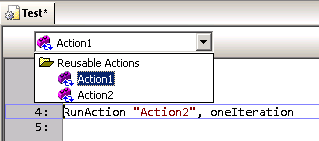
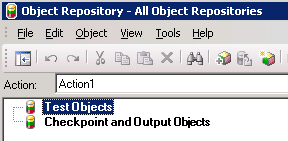
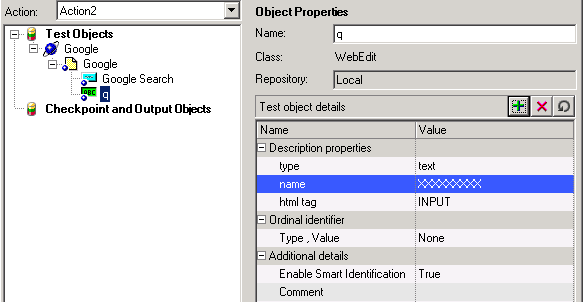
Inside the OR window, there's a dropdown list where you can select which action you want to edit the containing objects. Turns out that, if you change to another that is different from the current one on QTP window, the OR (or QTP itself - who knows?) doesn't save the changes you make. Fuck! Oh boy!


After following the steps above, all changes you made are not saved.

Workaround: Well, there nothing much to do about it, except to close the OR window, switch to the correct action in QTP and re-open the OR window. By doing so, you guarantee that the objects/checkpoint/etc you edit will be correctly updated and saved.

quinta-feira, 6 de junho de 2013

[BUG] Fasten your seat belts, QTP menu is missing!

Oh boy, yet another shameful bug on QTP. Not much to say this time as you are probably tired of reading the same whining over and over. And I don't feel like joking around. Sorry.

I have absolutely no idea why it happens. It just happens.

From time to time, QTP seems to lose or forget its menu configuration, leaving the user with a very limited amount of options. See examples below.


Workaround: fortunately for us, there a very simple way to make QTP put its menu configurations back in place, where it should never had left.

Right-click anywhere in the menu/buttons area and select Customize.


Next, go over the Toolbars tab and click Restore All button. Confirm and be happy.


Next, I recommend you to close down and restart QTP. Never knows.

quinta-feira, 14 de março de 2013

[BUG] Successfully failed!

People say that an image worth a thousand words, so here it goes.

My coworker sent me this screenshot, showing the QTP update process result.


I wonder why am I not surprised to see such thing.

sexta-feira, 1 de fevereiro de 2013

[BUG] Tab, tab..... CRASH!

What a great day to find yet another shameful bug in QTP 10. And this time a very quick and dirty one.

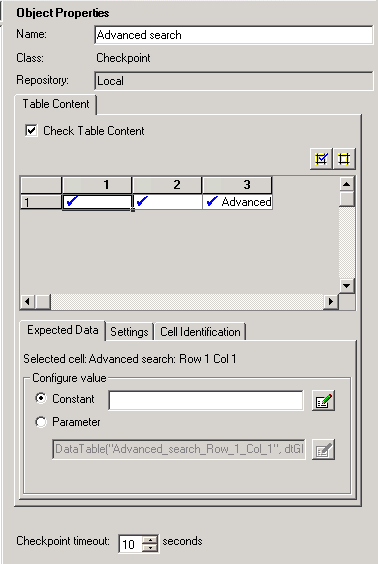
Let's get to it. Say you have a WebTable checkpoint, and you need to edit one or more table fields content. Well, that's a very common task, right? Applications change and you have to maintain your script with up-to-date system information. If you're like me, this screen is printed in your retina, as we have to visit on a daily-basis.

Turns out that I found a very stupid bug that makes QTP crashes here.

Under "Configure value" area, select "Constant" option and focus the edit field to the right. Now, press Tab key twice and watch QTP stop responding.


Bye, bye QTP. See you again after the Control + Alt + Del.

Workaround: avoid the steps described above.

sexta-feira, 18 de janeiro de 2013

[BUG] Multiple small issues

This time I decided to post several small issues I face every day at my work in a single post on this blog, just to make it easier for myself and for the sake of simplicity. This post is much larger than the previous ones, but separately they wouldn't be worth mentioning.

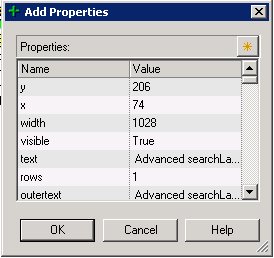
Add description property screen is always small: this is certainly a developer laziness issue. The screen 'Add Property' in Object Repository window do not record its size and position when exiting. So, EVERY TIME you have to re-size it. Annoying!


Object repository window doesn't re-sizes correctly: when editing a  table checkpoint (and a few other objects I can't recall), here is what happens when you re-sizes the window. Controls at the right side are not re-sized accordingly. It's a REAL PAIN to edit the cell contents.


Also (1), you may notice that fields under 'Configure value' section are disabled. This is due a bug where Alt-Tab'ing out from this window, makes the fields to become disabled. Hell Who knows why...

Also (2), after re-sizing controls in this window (and making it better to work with), when you exit and re-open it all controls will be reset to its default positions. And that SUCKS A LOT!


Random crashes: seriously, who NEVER EVER suffered a single crash during QTP execution or (more commonly) after closing it down? Usually, when you start experiencing weird QTP behavior after hours and hours of work, close it down and you will get one of these. Below, follows an example.


Code auto-complete is more like a pain in the ass back: usually, when well implemented, the auto-complete functionality is VERY useful, since no one remembers all functions, variables and object names all the time. Also reduces typing and typos. But frequently, auto-completed in QTP just stays in your way. It only comes out in few opportunities, and doesn't really bring you what you want.


Jump to step doesn't always work: one good feature from Results Viewer app is the "Jump to Step" option. On (almost) every step recorded in the test result, you can right click it and choose "Jump to Step in QTP" to automatically switch to QTP in the exact line executed, but for some strange reasons, some steps are not 'jumpable'.


I can't determine why it happens (perhaps it's a step executed from inside a function on a Function Library, I don't know), but for whatever reason it's another huge fucking developer laziness.